
IntelliCAD 15.0 Released
A Trusted, Open Platform for CAD Solution Providers
IntelliCAD 15.0 is now available, combining significant performance improvements with a wide range of new features and usability enhancements. This release introduces AI-assisted workflows, a preview of Drawing Compare, a completed LISP API, and continued gains across drafting, BIM, printing, and everyday productivity, all built on the open, extensible IntelliCAD engine that member companies rely on for vertical applications, proprietary tools, and complete CAD solutions.
Below are some of the key highlights. For a complete overview, watch the IntelliCAD 15.0 Overview Movie and review the full release notes.
Drawing Compare (Preview)
See exactly what changed between two drawings with the new COMPARE command. Differences are color-coded automatically, objects unique to each drawing stand out in red or green, shared objects appear in gray, and related changes are enclosed in revision clouds for fast visual review. A dedicated Compare toolbar makes it easy to step through differences and pull entities from one drawing into the other.
Note: Drawing Compare is available for testing and feedback in 15.0. Save your work before trying it, and use Send Feedback to report issues.
AI-Powered Workflows
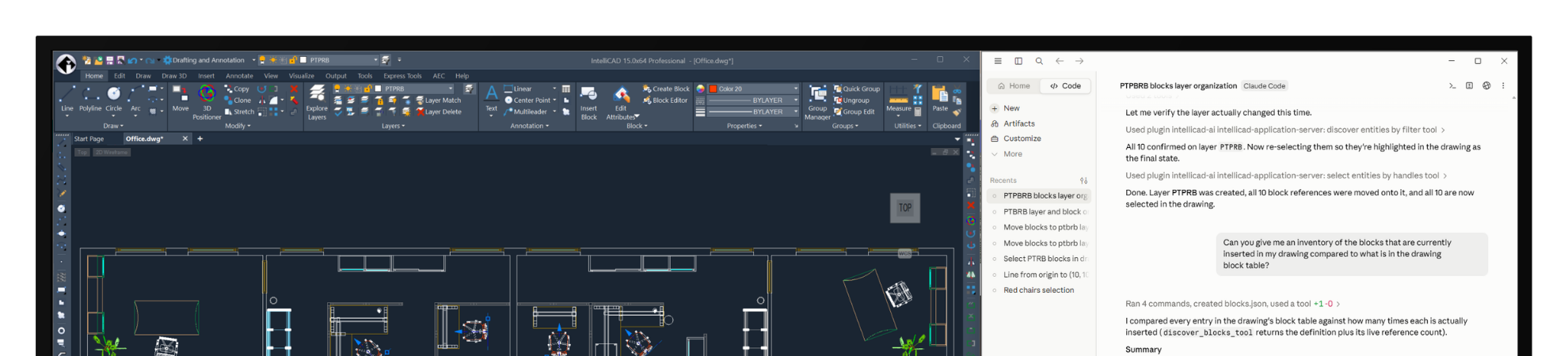
IntelliCAD is moving with the industry into AI-assisted design. For supported program versions, 15.0 makes it simple to connect a preferred AI client, including Anthropic® Claude®, Google® Antigravity™, or OpenAI™ ChatGPT®, directly to the drawing environment. Once connected, users can query drawing data, select entities, and even generate and run custom LISP code, all using plain, natural language instead of memorizing commands or syntax.
A Complete, Modernized LISP API
IntelliCAD 15.0 rounds out its LISP API with a set of long-requested developer tools. Developers can now protect their LISP code before distributing it, compiling source into standard, AutoCAD-compatible formats instead of shipping it in the open. The new VLISP-COMPILE function compiles LISP source into a protected .FAS file, and the new MAKELISPAPP command, guided by the new Make LISP Application Wizard, compiles one or more LISP source files into a protected .VLX application. Both formats are fully compatible with AutoCAD, giving developers a straightforward way to share their work without exposing the underlying code. DCL dialogs also get a visual upgrade with broader image support and layouts that match AutoCAD more closely, and a new notification function lets LISP routines communicate directly with users. With this release, the LISP API is complete, and the legacy API has been retired.
API Enhancements for Developers
Both the ActiveX/COM and .NET APIs gain new capabilities in 15.0, giving developers deeper access to block properties, table data, and custom palette behavior. Command registration is also more reliable, so third-party applications run in the correct context every time. Together, these updates make it easier to build and maintain automation tools and custom applications on IntelliCAD.
BIM Special Interest Group Achievements
BIM workflows keep getting stronger, with new support for Revit Type Catalogs, improved IFC import for complex wall geometry, and added flexibility for curved wall design.
User Interface Enhancements
Standard versions of IntelliCAD now include the Ribbon, Quick Access Toolbar, and Start Page by default, bringing a more modern experience to every user. IntelliCAD Explorer is easier to navigate with resizable and freezable columns, the application loader has a fresh, more intuitive design, and small usability touches, like showing the active command name and quick access to Sheet Sets from the Start Page, keep everyday work moving smoothly.
Enhancements to Existing Functionality
Everyday tools got sharper in this release. The Revision Cloud command adds new creation options, FILLET and CHAMFER now preview results before you commit, entity snap tracking is smarter around arcs, and Table AutoFill automatically continues common sequences. Multiline Text and tables also pick up small but welcome upgrades, including spell checking for tables.
Printing and Publishing
Printing and publishing get more flexible in 15.0, with new print resolution options, additional shade plot styles, and the ability to add DXF files to a publish list, all designed to give users more control over how drawings are shared and presented.
Performance Improvements
Performance remains one of our highest priorities, and 15.0 delivers some of the biggest gains yet. Large slide images now load and display up to 3x faster, VBA iteration through Model Space is up to 48x faster, and Undo is up to 12x faster with VBA enabled. Compiled LISP applications also run up to 3x faster, and entity snapping has been refined for a noticeably more responsive drafting experience.
Additional Enhancements
Rounding out the release, IntelliCAD 15.0 adds slide library support to the VSLIDE command, an upgraded ACIS modeling kernel, more flexible linear segment geometry, and updated core libraries, all continuing to strengthen the platform underneath the surface.