
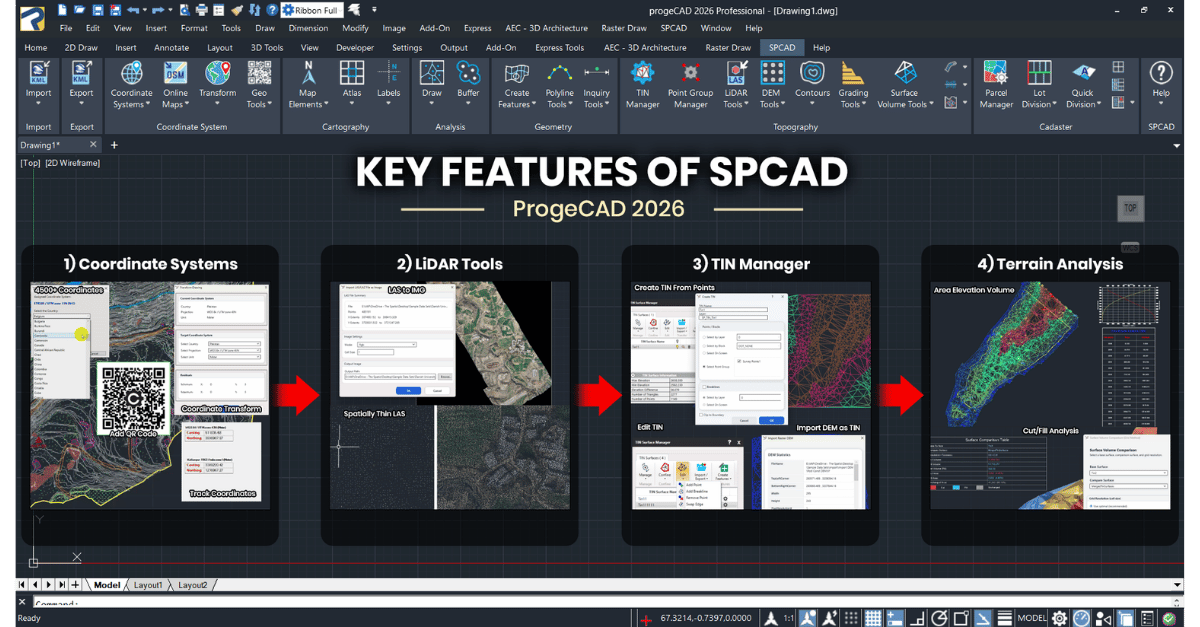
A CAD development company's view of where IcARX shines, where it required workarounds, and what we'd tell another team starting today.
This is part of a series sharing how development companies are using IcARX to bring their products to IntelliCAD-based CAD platforms. IcARX is the IntelliCAD Technology Consortium's ObjectARX®-compatible C++ API. For developers with existing ObjectARX projects, it offers a familiar API surface and a practical path to a new host CAD without a complete rewrite.
Why This Post Exists
If you're a development team weighing whether to bring an existing ObjectARX-based product to a new CAD platform, the questions you actually want answered are technical. Will my code compile and behave the way I expect? Where will I hit friction? What kind of testing matrix should I plan for?
This post is built around those questions. The source is a structured Q&A with Cadomation's CEO, Imran Anees, about their work bringing SPCAD, an advanced geospatial and surveying toolkit with more than 180 specialized commands, into the progeCAD environment using the IcARX API.
SPCAD already ran on multiple ObjectARX-compatible CAD platforms before this work began. Adding progeCAD was a deliberate platform expansion, made tractable by an architecture designed from the start to span multiple CAD environments. That foundation is part of why the IcARX path was realistic.
What follows is organized as problem to approach to outcome, with specific technical observations called out where they help.
The Problem
CAD users in surveying and civil design were jumping between multiple applications to complete a single workflow. Each handoff cost time and introduced opportunities for error. Cadomation's product hypothesis was simple: bring those workflows into a single CAD environment so users could manage geospatial data, terrain models, and parcels in one connected place.
For SPCAD, the question was where that environment should live. The platform had to satisfy two constraints at once:
- Technical fit. A DWG™-native environment that felt familiar to users and could handle heavy work like TIN surface generation without grinding.
- Commercial fit. A platform that reaches users who care about flexibility and long-term value, including perpetual licensing.
progeCAD, built on the IntelliCAD engine, met both. The IcARX framework was singled out as especially important because it created a practical path for ARX-style development and for reusing existing code.
"The IcARX framework was especially important as it created a practical path for ARX-style development and code reuse." Imran Anees, CEO, Cadomation
The Approach
Cadomation framed this work as a focused product adaptation rather than a from-scratch build. SPCAD was already a mature, multi-CAD product, so the team moved through three phases:
- Platform evaluation. Assess IcARX surface area against SPCAD's core dependencies.
- Core integration. Port the CAD object, database, and command logic that drives most of SPCAD's tools.
- Workflow validation. Run the production workflows users actually depend on, end to end, inside progeCAD.
The work was led by Cadomation's core CAD development team, with the explicit goal of making SPCAD behave reliably inside progeCAD so users would get the professional experience they expected.
What Worked Well
Two things stood out as genuine strengths of the IcARX surface from a porting perspective.
The core layer was solid.
For SPCAD, which works heavily with entities, geometry, custom commands, and production workflows, IcARX provided a practical way to bring substantial functionality across without a rewrite. The object and database model and the command-driven workflow patterns were familiar enough that the port was realistic.
"IcARX gave us a practical way to bring substantial functionality into progeCAD without rewriting the product from scratch."
Native-style entities and database access were strong.
When asked which IcARX capabilities were most important, the answer was direct: access to native-style entities and database functionality. SPCAD handles real CAD objects and complex production workflows, so having control over drawing databases and geometry was essential for terrain modeling, cadastral processing, and drawing automation.
The lesson for other teams: if your application's center of gravity is in the object database and core geometry, IcARX gives you a familiar, capable foundation.
Where the Friction Was: API Parity at the Edges
Cadomation was upfront about where the work got harder. The challenge was not the core logic. It was API parity at the edges, where higher-level UI behavior, customization, helper methods, and managed-wrapper coverage diverged from what an ObjectARX®-trained team expected.
In some cases, functions were missing. In others, they existed but behaved differently enough to require workarounds and extra validation.
A few specific examples surfaced in the interview, and they're worth listing because they're the kind of detail another team will want to plan for:
- GetOffsetCurves behaved reciprocally compared to AutoCAD® ObjectARX. Drop-in usage of some functions or features may not give you the result you expect. Plan for some small adapter layers.
- WPF and WinForms owner windows. Passing the main application window as the owner to modal or modeless WPF or WinForms windows could cause crashes. Owner-window handling needs care.
- No native ProgressMeter equivalent. Code paths that relied on ProgressMeter need an alternative progress mechanism.
- No support for a Block to be rendered as Transient Graphics. If you depend on this for visual feedback, you'll need a different approach.
These are real, concrete differences. They are not blockers, but they are not invisible either. Cadomation's takeaway was that productizing on IcARX required compatibility layers, fallbacks, and careful testing, and they planned for that explicitly.
"Successful productization required compatibility layers, fallbacks, and careful testing."
The good news, in their words: they're confident the IntelliCAD core development team will continue to address these issues and strengthen API compatibility in future releases.
The Outcome
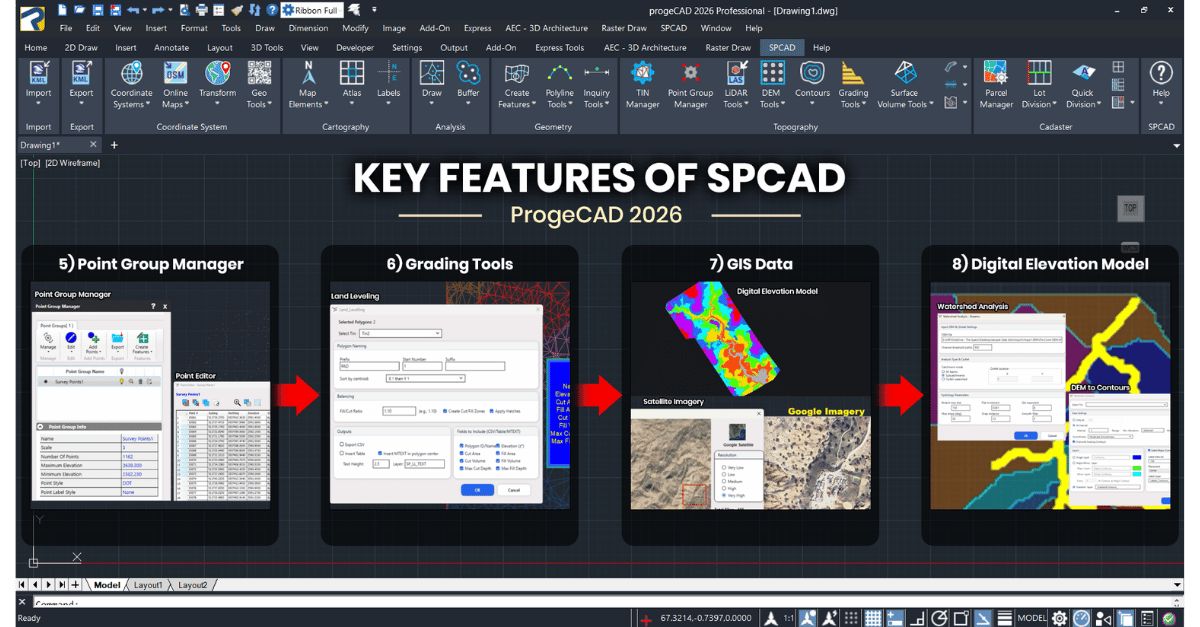
The user response has been encouraging. SPCAD users appreciate getting advanced surveying and terrain capabilities inside a CAD platform they already know. International demand surfaced quickly, including requests for multi-language support, which Cadomation now treats as a primary driver of its development roadmap.
Commercially, the platform expanded Cadomation's reach into customer segments that prioritize:
- A capable DWG-based platform with a lower barrier to adoption.
- Pricing that's easier to justify, particularly perpetual-license economics.
- Compatibility-first decisions in markets where affordability matters.
In Imran's framing, the IntelliCAD ecosystem moved Cadomation beyond a single-platform strategy and opened opportunities they did not have before.
What Cadomation Wants Next from the Platform
A practical wish list for the IntelliCAD platform, captured straight from the interview:
- Continued expansion of IcARX compatibility. Close the parity gaps at the edges.
- Improvements to CUIX file creation and management. A more streamlined UI framework matters for complex plugins.
- Performance improvements for plugin-heavy workflows. Larger datasets are increasingly common in their user base.
- Continued collaboration on developer priorities. Direct input from developer companies into the roadmap.
These are useful inputs for the IntelliCAD core team and for the broader developer community to know about. Several of them are areas the platform team is actively working on.
What's on Cadomation's Roadmap
Looking forward, SPCAD is expanding into:
- Automated LiDAR workflows.
- Road and irrigation infrastructure design modules.
- Hydropower and solar power design modules.
- Spatial analysis tools.
Imran summed up the underlying principle: keep reducing the gap between CAD drafting and geospatial and civil engineering production work.
Lessons for Teams Considering an IcARX Port
Pulling the practitioner observations together into a short list other developers can use:
- Lead with your core. If your product depends primarily on entities, the database, and standard command flows, IcARX is well-suited. Prioritize that path first.
- Plan for edge-of-API work. Budget time for compatibility workarounds around UI behavior, helper methods, and managed-wrapper gaps. Don't assume drop-in.
- Use phased validation. Platform evaluation, then core integration, then workflow validation against real production scenarios. Don't compress these.
- Expect some differences in some functions. GetOffsetCurves direction, owner-window handling, ProgressMeter equivalents, and transient block graphics required workarounds. Plan for some unexpected gaps or behaviour differences that will need special attention. The good news is that the IntelliCAD team is quick to address these gaps.
- Treat your platform partners as collaborators. Issues surfaced during a port follow a real chain. The developer raises them with their CAD platform partner, who triages and works with the IntelliCAD core development team to address them in the engine. That partnership works when everyone stays engaged. For Cadomation, progeSOFT was a strong facilitator throughout, and the IntelliCAD core team was responsive to the issues raised. Build feedback loops into your release cadence so the partnership compounds over time.
Closing Note from ITC
This is one developer's experience, captured honestly. Other teams will have different starting points, different dependencies, and different timelines. What we can say is that the lessons here, both the strengths and the friction points, are consistent with what we hear from other IcARX developers.
If you'd like to dig deeper, we're hosting a developer webinar on June 16: Build on IntelliCAD: Developer Platform Options for Every CAD Application. The session walks through the development paths available on IntelliCAD, including IcARX, IRX, native Teigha .NET®, AutoLISP, and our new Integrator tier, with case studies drawn from companies building on the platform, including Cadomation.
To learn more about the IntelliCAD platform and the IcARX API, visit intellicad.org. To learn more about Cadomation and SPCAD, visit cadomation.com. To learn more about progeCAD and progeSOFT, visit progeSOFT.com.
Autodesk, AutoCAD, ObjectARX, DWG, and AutoLISP are registered trademarks or trademarks of Autodesk, Inc. IntelliCAD Technology Consortium is not affiliated with or endorsed by Autodesk. SPCAD is the proprietary property of Cadomation. Microsoft and .NET are registered trademarks or trademarks of Microsoft Corporation.